
How Universal Map Link Tools Eliminate App Mismatches in Location Sharing
The Hidden Challenges of Sharing Location Links Across Apps
Every map app generates links tied to its own ecosystem. A Google Maps link has a maps.google.com URL structure that iOS interprets as a web link, not a navigation command. When an iPhone user taps it, Safari opens instead of Apple Maps. The reverse happens when an Android user receives an Apple Maps link; the URL resolves to a webpage, not a map pin.
The technical barrier is protocol handling. iOS and Android register different URL schemes for map intents. Apple Maps uses maps.apple.com and the maps:// scheme; Google Maps uses maps.google.com and comgooglemaps://. A link formatted for one scheme won’t trigger the other app’s deep-link handler. When someone shares a place from Apple Maps to an Android user, the link opens in a browser instead of launching Google Maps directly, forcing the recipient to manually copy the address and paste it into their preferred app. The operating system sees it as a generic web URL and routes it to the browser.
This isn’t a problem when everyone in a group uses the same platform. But when you share a location with someone whose phone defaults to a different app, the link fails. They see a browser tab, not turn-by-turn directions. If they’re driving or in a hurry, that added friction, copying the address and pasting it into their preferred app, can lead them to skip the share entirely.
How Universal Share Links Solve App Mismatch Issues
A universal share link sits between the sender and the recipient. Instead of embedding a platform-specific URL, the link directs to an intermediary service that detects the recipient’s device and installed apps, then redirects to the appropriate platform.
Here’s how it works: when you generate a universal link for a location, the tool stores the place data, coordinates, name, address, on its server and returns a neutral URL. When someone taps that URL, the server reads the device’s user agent string and checks which map apps are installed. If the recipient has Google Maps on Android, the link redirects to a comgooglemaps:// intent. If they’re on iOS with Apple Maps, it redirects to a maps:// URL. If neither is installed, the link falls back to a web-based map view.
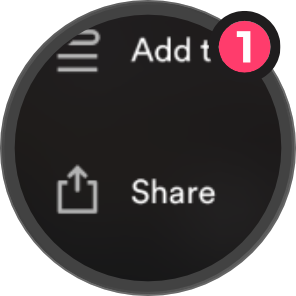
Share as Usual
Share a place like you normally would.
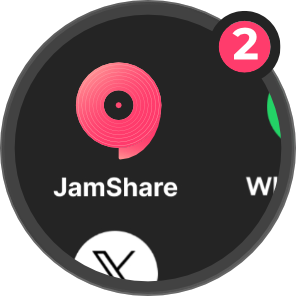
Tap JamShare
Tap JamShare, and we’ll handle the rest.
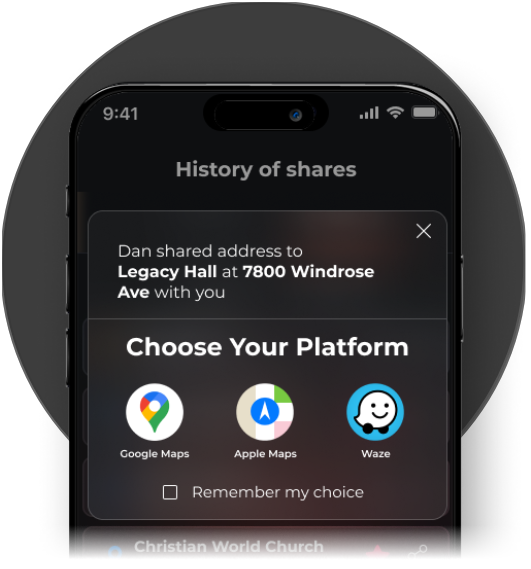
Choose Your Platform
Recipients open the address in Google Maps, Apple Maps, or Waze, whichever they use.
The trade-off: a universal link adds a redirect step, introducing a brief delay before the map opens. For a single share to a known audience on the same platform, that overhead isn’t worth it. But for repeated shares to mixed audiences, friends split between iOS and Android, event invitations to a public group, business locations sent to customers, the redirect is negligible compared to the friction it eliminates.
Myth vs. Reality: The Effectiveness of Location Sharing Apps
Myth: Any app that lets you share a location link will work across platforms.
Reality: Most apps generate links that only work reliably within their own ecosystem. When you tap “Share” in Google Maps, the resulting URL is a Google Maps link. It will open Google Maps on Android if the app is installed, but on iOS, it defaults to a browser unless the recipient manually selects “Open in Google Maps.” Apple Maps links behave the same way in reverse; they work seamlessly on iOS but break down on Android.
The assumption that “it’s just a link” overlooks how mobile operating systems handle deep links. A URL isn’t a neutral pointer; it’s a formatted instruction that tells the OS which app to launch. When the OS doesn’t recognize the instruction, because the app isn’t installed or the scheme isn’t registered, the link degrades to a web view.
Some apps claim cross-platform sharing but only support a limited set of platforms. A tool might route between Google Maps and Apple Maps but ignore Waze, Citymapper, or other navigation apps. If your recipient uses one of those, the link still fails. True universal support means detecting all installed map apps and prioritizing the one the user actually opens by default.
A URL isn’t a neutral pointer; it’s a formatted instruction that tells the OS which app to launch.
Checklist: What to Look for in a Map Link Sharing Tool
When evaluating a map link tool, check for these features:
The most common mistake is choosing a tool based on feature count rather than the specific mismatch problem you’re solving. If you only share locations within a closed group using the same platform, a universal link tool is excessive. But if your audience is mixed, customers on different devices, friends split between iOS and Android, public event invitations, the ability to generate one link that works everywhere is the only feature that matters.
Real-World Scenarios: When Universal Map Links Make a Difference
A restaurant owner sends the business address to customers who book reservations online. Half the customers use iPhones, while the other half use Android. When the owner sends a Google Maps link, the iPhone users tap it and end up in Safari, staring at a map they can’t navigate. They either give up or manually copy the address into Apple Maps, leading to some arriving late because they skipped the step entirely.
The owner switches to a universal link tool. Now the same URL opens Google Maps for Android users and Apple Maps for iOS users. No browser, no extra steps, no confusion. The link works every time, regardless of the recipient’s device.
This principle applies to any scenario where the sender can’t control the recipient’s setup. Event organizers sending venue locations to public attendees, real estate agents sharing property addresses with clients, delivery drivers receiving drop-off points from dispatchers, all face the same issue. A platform-specific link is a gamble; a universal link removes the guesswork.
The only situation where a universal link doesn’t help is when the recipient has no map app installed at all. The link will fall back to a web view, but if the user needs turn-by-turn navigation, they’ll still need to install a map app. The universal link solves routing between installed apps but doesn’t replace the apps themselves.
Related JamShare guides
- How universal share links solve app mismatch in music sharing
- How to share music across platforms
- Why music + maps matter
- Share map links across apps
Frequently Asked Questions
Making the Call on Your Setup
Start by identifying the specific mismatch problem you face. If your shares fail because recipients use different platforms, a universal link tool fixes that. If your shares work fine but you want better tracking or batch management, look for those specific features. As cross-platform sharing becomes more common, universal links that work seamlessly across location apps will likely become the standard way people exchange places. The tool should address a friction point you’re already encountering, not complicate a process that works.
If you’re sharing music and location links across different apps and facing app mismatches regularly, JamShare handles both in one place and generates universal share links that open in each recipient’s preferred app.